
You can't tell from the order page. On a P2P sale, the "paid" status appears because the buyer tapped a button, and the screenshot, text or email they send you can be forged in minutes. The only proof that counts is what you see when you log in to your own bank account or wallet yourself: this specific payment, credited in full, from a sender whose name matches the buyer's verified name on the order. If any one of those three is missing, hold off on releasing.
That rule is narrow on purpose. It ignores everything the other side shows you and looks at a single place you control. The rest of this page covers why nothing else qualifies, and the one case where the money has arrived and you still shouldn't release.
Who pressed "paid" on the order?
A peer-to-peer trade (some platforms call it C2C) runs like this: the buyer opens an order, sends money outside the platform, then comes back and taps a button such as Payment Completed. The order status changes and you get a notification. All that change tells you is that the buyer pressed the button. It says nothing about whether money left their account, let alone whether it reached yours.
Platform rules treat it the same way. OKX's C2C Trading Rules tell buyers not to click Payment Completed before paying, and call doing so "fraudulent payment behavior." The button is a claim by one party, not a receipt from a bank.
The same rules ask sellers to release "within 10 minutes of confirming receipt of full payment." Confirmation comes first; the clock starts after it. A notification on the order simply means: go and look.
Screenshots, bank texts and "platform" emails all fail the test
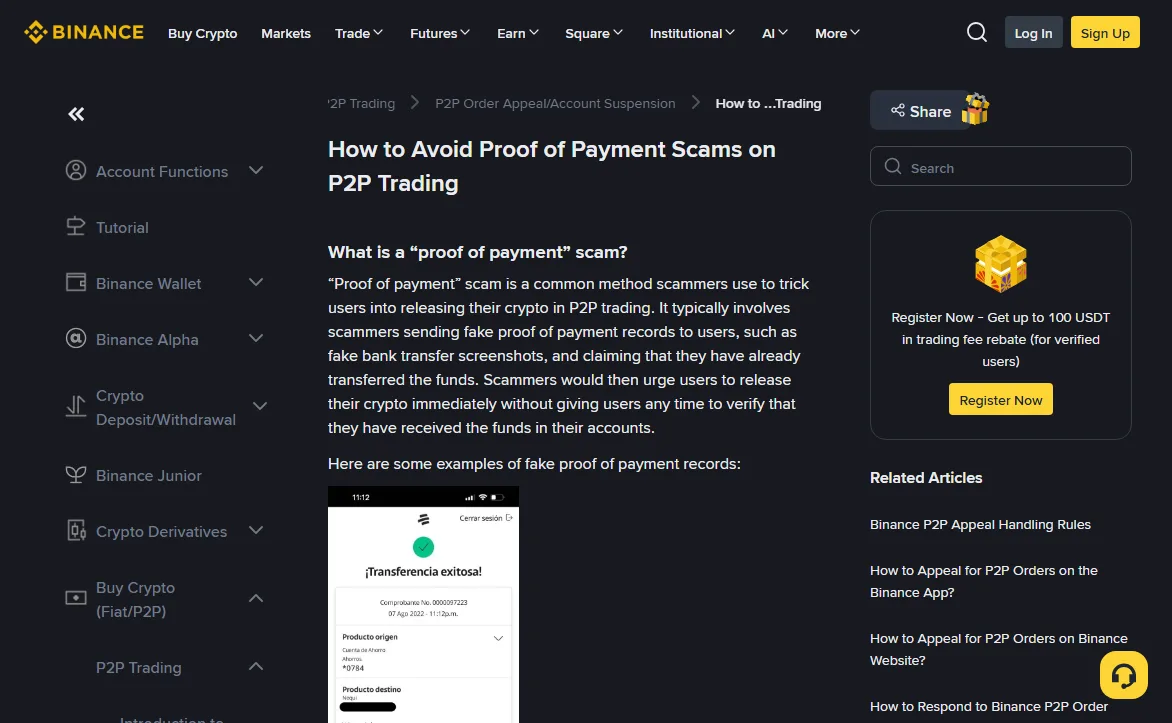
Binance has a help article devoted to exactly this, How to Avoid Proof of Payment Scams on P2P Trading. Its core instruction fits on one line: only release crypto if you confirm the funds have arrived in your account. A second Binance page on common P2P scams goes through the usual "evidence" one item at a time.
October 2026
The transfer screenshot
A screenshot is a picture. Changing the amount, the timestamp, or "pending" to "successful" takes no special skill. Binance lists giveaways such as spelling mistakes, misaligned text and mixed fonts, but the reverse inference fails: a screenshot with no visible flaws can still be fake. There's a harder variant, too. The screenshot is genuine, but the same payment is being presented against more than one order at once. Binance's common-scams page describes this as a triangle scam and warns that "scammers may try to reuse these proofs."
The "you've been paid" text
Binance calls these SMS scams: a message built to look identical to a bank or wallet notification. Sender name and wording can both be copied. Don't tap any link in it and don't trust the balance it quotes. Close it and open your banking app the way you normally would.
An email or chat message from "the platform"
Some scammers impersonate the exchange, emailing that the buyer's funds "have been confirmed" and the trade should be completed; others claim to be customer support inside the order chat. Binance's own wording: it "will never send emails asking you to complete a P2P transaction." Whether to release is decided by you, after you've looked at your own account. Nobody else's confirmation stands in for that.
Three checks to make before you release
- Go in through your own banking app or online banking. Not a link the buyer sent, not a QR code they shared. Can't log in right now? Binance's guidance is blunt: if you can't log in to verify the payment, don't release, even if the counterparty is pressing you.
- Find the transaction, not the balance. Your balance can include other money. Locate the single credit that belongs to this order: same amount, full amount, and showing as completed rather than pending.
- Read the sender's name. The payer on that credit should match the buyer's verified name on the order.
A matching amount still leaves the payer's identity to check. If your statement line truncates the sender's name, open the transaction details or ask your bank. Still can't match it? Raise it through the order's appeal function rather than guessing.
The money arrived, but the payer isn't the buyer
One person opened the order and someone else paid. That's a third-party payment, and the arrival of the money doesn't connect that payer to your trade. Binance's common-scams page tells sellers to check that the name on the payment matches the buyer's verified name, not to accept payments from third-party accounts, and, if one comes in, to file an appeal and refund it to the sending account. The same page describes a man-in-the-middle setup in which contact made outside the platform leaves the money flowing in a different direction from the order. A mismatched name alone doesn't prove which scheme, if any, you're looking at. It does mean you stop and verify. If that money is later disputed or reported by someone else, your receiving account can be pulled in as well; why P2P cash-outs get bank accounts flagged covers that side.
OKX's rules give the seller a way out but more than one deadline. Under "Requirements for Sellers," a seller paid from an account that doesn't match the buyer's verified identity may request cancellation and must refund within 12 hours of receiving payment. Item 6 of the buyer-misconduct table says the seller may refund within 2 hours, and that if the seller hasn't cooperated after 12 hours, support can force-release the crypto or deduct equivalent assets. Don't read those as one grace period. Open an appeal on the order straight away, ask official support which deadline applies to your case, and keep their reply. The "1st offense, account frozen for 24 hours" line in that table applies to the buyer who paid from a non-matching account. For a seller who goes ahead anyway, the rules say any resulting risk is borne by the seller, and that support may restrict some seller functions if a complaint follows.
Refunds should be arranged through the order appeal and normally go back to the account the money came from. If the buyer asks you privately to "send it to this other account instead," don't. OKX's rules do allow official support to coordinate the parties and name another verified receiving account for a refund, so check any such instruction through the appeal channel you opened yourself, never on the word of someone in the chat calling themselves support, and never through a link they supply. If your account has already been restricted, the payment is being reversed, or police are involved, ask your bank and the officer handling it what they need from you before moving anything.
The payment method matters as well. Binance notes that some payments can be pulled back afterwards through a chargeback, and that a buyer insisting on paying by cheque deposit is "most likely a scam." Money from these routes can show as received without being as settled as a completed bank transfer.
The more the buyer pushes, the more the order matters
Lines you may see in the order chat, and what each one skips
- "I've paid. Release now or I'm opening an appeal." Appeals let either side ask the platform to review the order and payment records. If you release before confirming receipt, the crypto leaves escrow even though you have not verified payment. Keep the order chat and your account records for the appeal.
- "My bank is slow, here's the screenshot for now." If the transfer is slow, wait for it. A picture of a transfer is still only a picture.
- "Support has already confirmed my payment." Support can't see into your bank account.
- "Add me on WhatsApp or Telegram, it's quicker." Once the conversation leaves the order page, the platform no longer has the record, and any later appeal is missing part of the story. Binance's advice is not to respond to P2P trading requests outside Binance P2P.
Both sides do work against a clock. The buyer has a payment window, and OKX's rules give the seller 10 minutes to release after confirming full payment. That limit applies once the check is done; it gives nobody a reason to skip the check. If the money hasn't shown up, open an appeal on the order and let the platform step in, instead of arguing it out in the chat.
If you've already released the crypto
Once released, the crypto leaves escrow and goes to the buyer. You can't call it back the way you can cancel an unfilled order. Report it at once and keep your evidence, but treat the appeal as a request for help, not a promised refund: whether anything can be recovered depends on the order and on where the assets have gone.
- Report through the support or appeal option inside the platform's own app, with the order number. Don't phone a "support number" from a search ad or a direct message; check the contact route from inside the official app first (see how fake support finds you).
- Save the order page, the full order chat, the original image files of any screenshots the buyer sent, and your bank statement for the period. Put a copy on a second device.
- Report it to the police where you live. In the United States, the FBI takes online fraud reports through its Internet Crime Complaint Center at ic3.gov.
- If someone later contacts you offering to recover the crypto for an upfront fee, ignore them. The FBI's Internet Crime Complaint Center issued a public warning in June 2024 about fictitious law firms approaching crypto scam victims with exactly that offer.
For the steps in order, by situation, work through the first 72 hours checklist.
Sources
- Binance Support: How to Avoid Proof of Payment Scams on P2P Trading
- Binance Support: How to Avoid Common P2P Scams
- OKX: OKX C2C Trading Rules (Requirements for Buyers and for Sellers, and the buyer and seller abnormal-behavior tables)
- FBI Internet Crime Complaint Center: Fictitious Law Firms Targeting Cryptocurrency Scam Victims Offering to Recover Funds (2024-06-24)
The Binance and OKX pages above were read on 2026-10-02. Deadlines and button names change between platforms and over time; the rule page of the platform you're actually trading on is the one that applies to your order.